Amazon Ads keyword expansion
Intermediate · 2 min read
For one keyword, AMS Keyword Search combines Amazon's A–Z suggestions with real book search results. You get a list of related keywords and of matching books with their author and ASIN or ISBN: a starting point for an Amazon Ads keyword list.
Daily AMS keyword searches: not included in the Free plan, Starter 10, Pro 10, Autopilot 25. New accounts get Pro limits for 7 days.
1.Run a search
Open AMS Keyword Search in the left menu, click New Search and enter one keyword, for example "mindfulness". Each search counts as one of your daily AMS keyword searches. If a search fails, try it again with a different keyword.
2.Read the two kinds of rows
The suggestion rows come first. Their Type is Amazon A-Z Suggestions and they show the related phrases Amazon offers for your keyword. Below them are rows whose Type is Search Results: real books that match, with Author and ASIN/ISBN filled in.
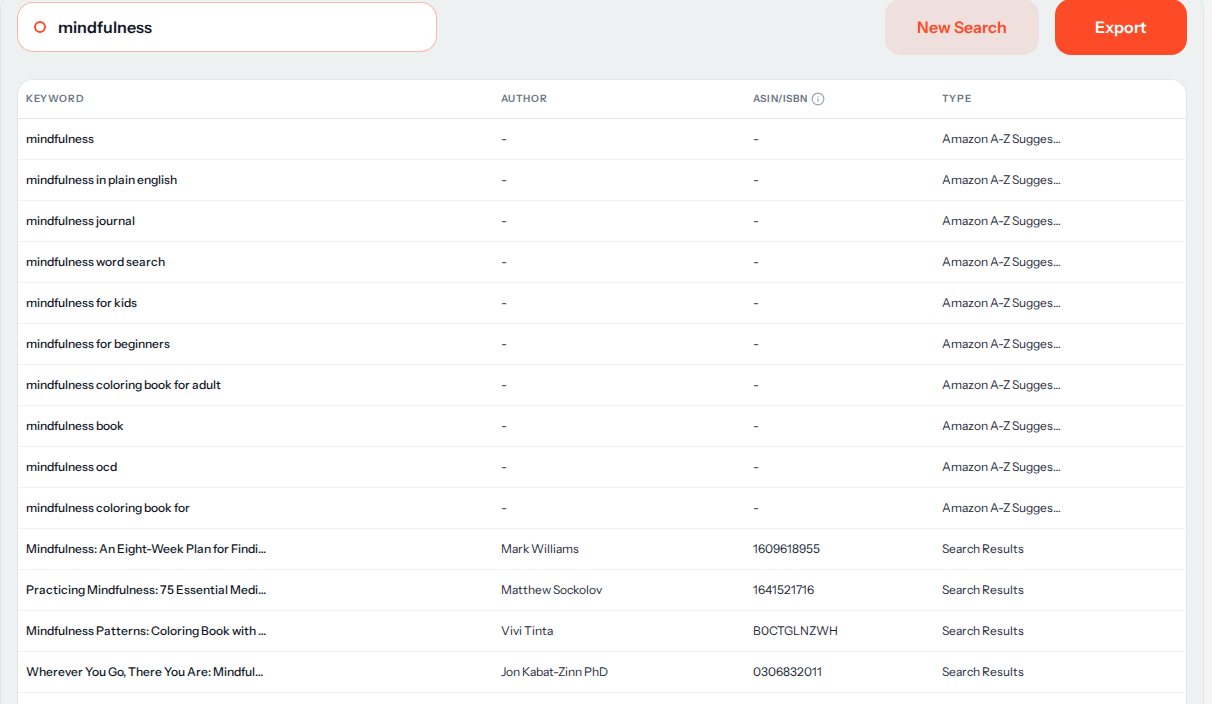
Real results for "mindfulness". 3.Build your list
Pick the suggestion phrases that describe your book. Use the ASINs of books that are close to yours as product targets. Leave out anything that does not fit your book: a keyword that does not match what readers will find is a wasted click.
4.Take it to Amazon Ads
Use Export to download the rows as a CSV file, then copy your chosen keywords and ASINs into your campaign in Amazon Ads. RankForged does not create or change campaigns for you.
All sales, earnings and demand numbers in RankForged are estimates based on public Amazon data, not exact figures.
More help
Next guides
- Keyword research (RankForged basics)
Find the keywords readers search for and compare demand with competition.
- Sales estimation: reading the signals
How to read the sales estimates and check them against rank, price, and niche context.