Competitor analysis workflow
Intermediate · 2 min read
Competitor analysis shows the books you would be up against for a keyword and what they look like: how old they are, how long, what they cost and how they rank. Use it to understand what is currently working in your niche.
Daily competitor analyses: not included in the Free plan, Starter 10, Pro 10, Autopilot 60. New accounts get Pro limits for 7 days.
1.Start an analysis
Open Competitor Analysis in the left menu, click New Search, enter a keyword, choose the book type (All Types, eBook, Paperback or Audiobook) and click Analyze. RankForged shows competitor books with performance estimates. You can also start one from the keyword results: click Analyze on a row. Each analysis counts as one of your daily competitor analyses.
2.Wait while the books are collected
The competing books are collected in the background and the page refreshes by itself when they are ready. If an analysis fails, try it again with a different keyword.
3.Read the table
Each row is one competing book: Title, Type, Author, Age (how old the book is), ABSR (Amazon Best Sellers Rank), Pages (number of pages), KWT (keyword in title: True or False), Price, DY (daily sales) and MO (monthly sales). The sales numbers are estimates. A green "Fully Enriched" label means all the book's details have loaded. Click See Categories under a title to see the categories that book is in.
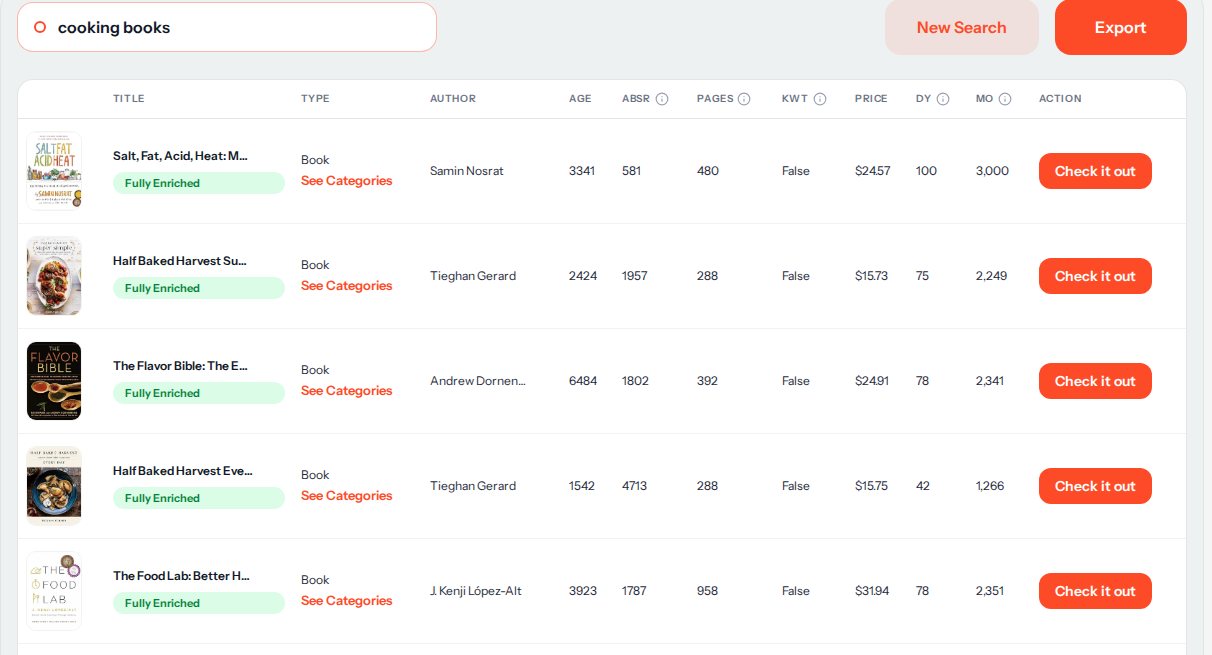
Real results for "cooking books". 4.Look for patterns
Read down the first ten books together. What is the usual price and page count? Do most of them have your keyword in the title (KWT)? Is there a recent book (low Age) that already ranks well (a low ABSR)? As a rule of thumb, that last one means newer books can still win in this niche.
5.Look at a book closely
Click Check it out to open that book's Amazon page in a new tab. Look at its cover, title and subtitle, description and reviews, and compare them with what you plan to publish.
6.Keep your results
Use Export to download the table as a CSV file you can open in Excel or Google Sheets.
All sales, earnings and demand numbers in RankForged are estimates based on public Amazon data, not exact figures.
More help
Next guides
- Keyword research (RankForged basics)
Find the keywords readers search for and compare demand with competition.
- Sales estimation: reading the signals
How to read the sales estimates and check them against rank, price, and niche context.