Category analysis for faster ranking
Beginner · 2 min read
Where your book is listed affects how easily it can rank. Category Search lists Amazon book categories for a word or phrase and shows how much selling happens in each, so you can compare them before you choose.
Daily category searches: not included in the Free plan, Starter 15, Pro 15, Autopilot 60. New accounts get Pro limits for 7 days.
1.Search for categories
Open Category Search in the left menu. Type a word or phrase of at least 3 letters, for example "thriller". Choose All, Books, Kindle or Audible to narrow the list, then click Search. Each search counts as one of your daily category searches.
2.Wait for the details
The categories appear first and their details fill in as they are collected; the page refreshes by itself. If a search fails, try a broader phrase or another segment.
3.Read the columns
Category is the Amazon category path. Sales #1 and Sales #10 give a sales figure for the #1 and the #10 book in that category. Pub % is the publisher percentage and KU % the Kindle Unlimited percentage. Insights opens more details about the category. All of these are estimates. In this real example many rows show the same figures: the table is built from a sample of books for your search, so treat the columns as a rough guide, not a ranking.
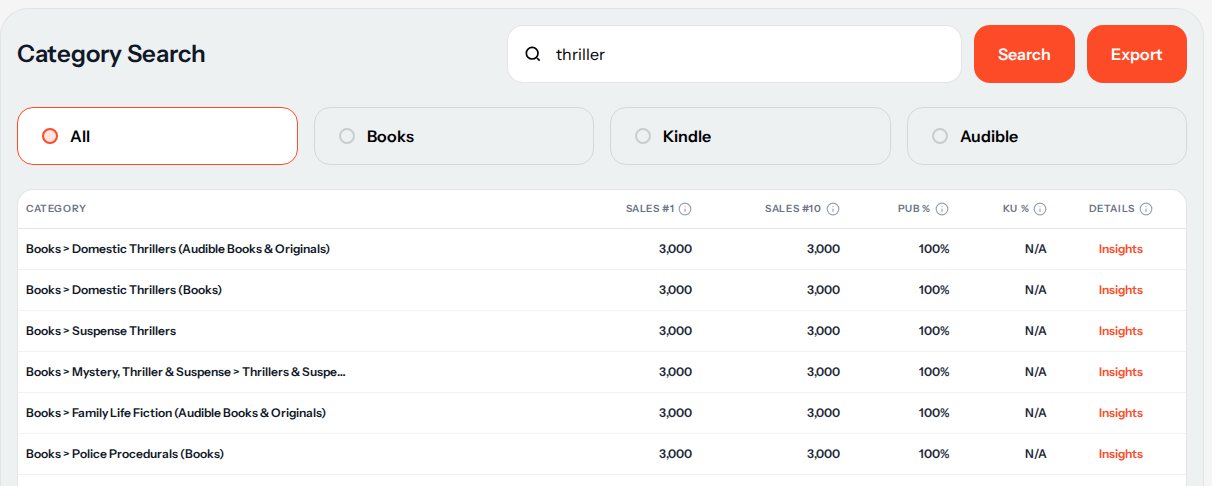
Real results for "thriller". 4.Compare and choose
Choose categories that fit your book first. Then use the columns to compare them: Sales #1 and Sales #10 show how much selling happens at the top of a category, and a high KU % means many of its books are in Kindle Unlimited. When several categories show the same numbers, open Insights for the one you are considering and check it against the books you can see on Amazon before you decide.
5.Use them in your listing
Choose the categories you picked when you set up your book on KDP.
All sales, earnings and demand numbers in RankForged are estimates based on public Amazon data, not exact figures.
More help
Next guides
- Competitor analysis workflow
See the top competing books for a keyword and what is working in your niche.
- Keyword research (RankForged basics)
Find the keywords readers search for and compare demand with competition.